
Buick Regal: Climate Controls
Dual Automatic Climate Control System
The climate control buttons on the center stack and on the climate control display are used to adjust the heating, cooling, and ventilation.
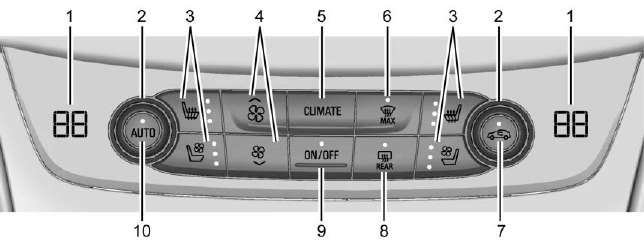 Center Stack Climate Controls
- Driver and Passenger Temperature Displays
- Driver and Passenger Temperature Controls
- Driver and Passenger Heated and Ventilated Seats (If Equipped)
- Fan Controls
- CLIMATE
- MAX Defrost
- Recirculation
- Rear Window Defogger and Heated Outside Mirrors
- ON/OFF (Power)
- AUTO (Automatic Operation)
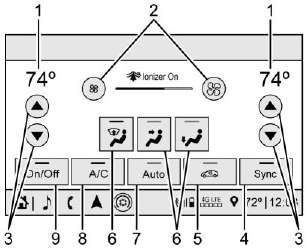 Climate Control Display
- Outside Temperature Display
- Fan Control
- Driver and Passenger Temperature Controls
- Sync (Synchronized Temperature)
- Recirculation
- Air Delivery Mode Control
- Auto (Automatic Operation)
- A/C (Air Conditioning)
- On/Off (Power)
Transmission

Manual Mode
Driver Shift Control (DSC) allows you to shift an automatic transmission similar to a manual transmission. To use the DSC feature:
1. Move the shift lever to the left from D (Drive) into the side gate marked with (+) and (-).
2. Press the shift lever forward to upshift or rearward to downshift.
READ NEXT:
 Steering Wheel Controls
The infotainment system can be
operated by using the steering
wheel controls. See "Steering Wheel
Controls" in the infotainment
manual.
Cruise Control
: Press to turn cruise control
on
or off. A wh
Forward Collision Alert (FCA)
System
If equipped, FCA may help avoid or
reduce the harm caused by
front-end crashes. FCA provides a
green indicator,, when a vehicle
is detected ahead. This indicator
displays amber if you follow a
vehicle
SEE MORE:
DTC C0055
Diagnostic Instructions
Perform the Diagnostic System Check - Vehicle prior to using this
diagnostic procedure.
Review Strategy Based Diagnosis for an overview of the diagnostic
approach.
Diagnostic Procedure Instructions provides an overview of each
diagnostic category.
DTC Descriptor
DT
DTC B1446 or B1447 (IOB/IO5/IO6)
Diagnostic Instructions
Perform the Diagnostic System Check - Vehicle prior to using this
diagnostic procedure.
Review Strategy Based Diagnosis for an overview of the diagnostic
approach.
Refer to Diagnostic Procedure Instructions for an overview of each
diagnostic category.
DTC Descripto
© 2019-2026 Copyright www.buregal6.com
